Countdown Widget & Timer
Keep an eye on your upcoming events - directly on your Home Screen!
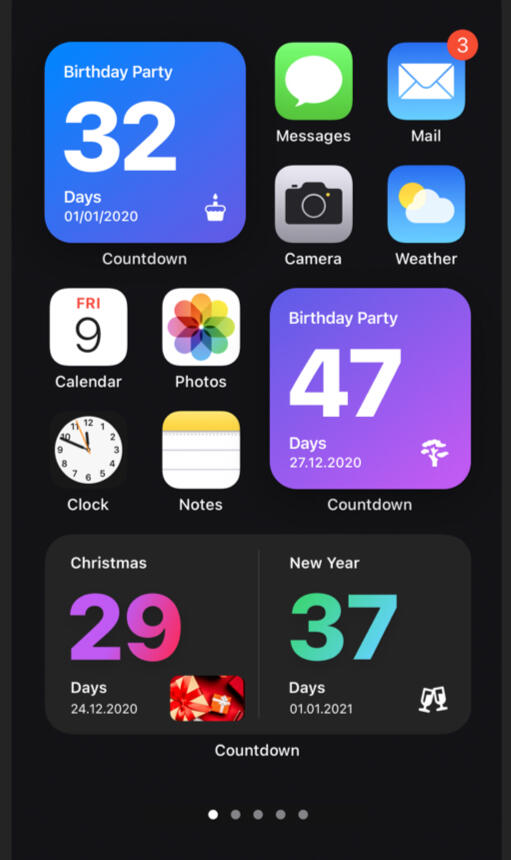
Create minimalistic widgets that countdown to the big day.The widgets are highly customizable and clean-designed, so that nothing distracts your focus from the concert, your best friend's birthday or whatever you're currently looking forward to!

Features
Powerful event editor with live preview
Multiple customizable widget templates for iPhone & iPad
Beautiful color gradients for your Home Screen
Over 50 different icons to choose from
Real time push notifications for your events
Full support for Voice Over and Dynamic Type
Live countdown widgets
Testimonials
"The widgets are gorgeous. My lock screen has never looked better."
"Simple, clean, and just works. Exactly what I wanted."
"I use it to count down to my kids' birthdays, my anniversary, vacations - basically everything. Can't imagine my home screen without it."
Customizable widgets to countdown to the big day

Helpful Links
Privacy Policy for Countdown
Last Updated: May 4, 2026
This Privacy Policy describes how Zach Tobin Consulting LLC ("we," "us," or "our") collects, uses, and shares information when you use the Countdown mobile application ("Countdown" or the "App").
By using Countdown, you agree to the collection and use of information in accordance with this policy.
1. Who We Are
Countdown is owned and operated by:
Zach Tobin Consulting LLC
Contact: [email protected]
We are the data controller responsible for your personal information.
2. Information We Collect
We collect only the information necessary to operate Countdown and improve your experience.
Information You Provide
- Contact information (name, email address) if you contact us for support
- Calendar and Reminders data if you grant permission for the App to access them
- Beta tester information (name, email, device info) if you join via TestFlight
Information Collected Automatically
- Usage data (app interactions, features used, session duration)
- Device information (device model, operating system version, language)
- Unique device identifier (UUID)
- Crash and diagnostic information
Payment Information
Subscription payments are processed by Apple through the App Store. We do not collect or store your payment card details. We receive only confirmation that a purchase occurred along with subscription status.
3. How We Use Your Information
We use your information to:
- Provide and maintain the App
- Process subscriptions and manage your account
- Improve features and fix bugs
- Respond to support requests
- Detect and prevent fraud or abuse
- Comply with legal obligations
We do not sell your personal information.
4. Device Permissions
Countdown may request the following permissions on your device:
- Calendar access — to read, create, and remove calendar entries related to your countdowns
- Reminders access — to read, create, and remove reminders related to your countdowns
These permissions are optional. You can grant or revoke them at any time in your device settings. Revoking permissions may limit certain App features.
5. Third-Party Services
We use the following third-party services to operate Countdown. Each has its own privacy practices.
| Service | Purpose | Privacy Policy |
|---|---|---|
| Apple App Store | App distribution and payments | apple.com/legal/privacy |
| RevenueCat | Subscription management | revenuecat.com/privacy |
| Mixpanel | Product analytics | mixpanel.com/legal/privacy-policy |
| Firebase Crashlytics (Google) | Crash reporting | firebase.google.com/support/privacy |
| TestFlight (Apple) | Beta testing | apple.com/legal/privacy |
6. Data Retention
We retain your information only as long as necessary to provide the App and comply with our legal obligations. When data is no longer needed, we delete or anonymize it.
If you delete the App, most local data is removed automatically. To request deletion of any remaining data we hold, contact us at [email protected].
7. Data Security
We use reasonable technical and organizational measures to protect your information. However, no method of transmission or storage is 100% secure, and we cannot guarantee absolute security.
8. International Users and Data Transfers
Countdown is operated from the United States. If you use the App from outside the U.S., your information will be transferred to and processed in the United States, which may have different data protection laws than your country.
By using Countdown, you consent to this transfer.
9. Your Privacy Rights
Depending on where you live, you may have the following rights regarding your personal information:
- Access — request a copy of the data we hold about you
- Correction — request that we correct inaccurate data
- Deletion — request that we delete your data
- Portability — request your data in a portable format
- Objection / Restriction — object to or restrict certain processing
- Withdraw consent — withdraw consent where processing is based on consent
To exercise any of these rights, email [email protected]. We will respond within the timeframe required by applicable law (typically 30–45 days).
For California Residents (CCPA/CPRA)
You have the right to know what personal information we collect, request deletion, correct inaccurate information, and opt out of the "sale" or "sharing" of personal information. We do not sell your personal information.
For Connecticut Residents (CTDPA)
You have rights to access, correct, delete, and obtain a copy of your personal data, and to opt out of targeted advertising or sale of personal data. We do not engage in either.
For EU/EEA and UK Residents (GDPR)
Our legal bases for processing are: (a) performance of our contract with you, (b) your consent, (c) compliance with legal obligations, and (d) our legitimate interests in operating and improving the App. You have the right to lodge a complaint with your local data protection authority.
For Residents of Other U.S. States
Many states (including Virginia, Colorado, Utah, Texas, Oregon, and others) grant privacy rights similar to those above. Contact us at [email protected] to exercise any rights available to you under your state's law.
10. Children's Privacy
Countdown is not directed to children under 13, and we do not knowingly collect personal information from children under 13. If you believe a child has provided us with personal information, please contact us at [email protected] and we will delete it.
11. Changes to This Policy
We may update this Privacy Policy from time to time. The "Last Updated" date at the top reflects the most recent revision. Continued use of the App after changes are posted means you accept the updated policy.
12. Contact Us
For any questions about this Privacy Policy or your data, contact:
Email: [email protected]
Privacy Policy for Countdown
Last Updated: May 4, 2026
First things first: You can use our apps completely free of charge. We will also never sell any data nor display any ads to you.
We offer some premium features that are available via subscription. You can check the currently available types and rates within the app. With your purchase you support the further development of our apps. Thank you for your support!
If your purchase is no longer registering and you want to restore it, you can do so any time and on any of your devices. Simply tap the “Restore” button on the purchase screen of the app.
For more information, please visit this page or contact us.
Subscriptions will be charged to your Apple ID account at the confirmation of purchase or after the free trial period if offered. Your subscription will automatically renew unless canceled at least 24 hours before the end of the current period. Your account will be charged 24 hours prior to the end of the current period. After purchase, you can manage your subscriptions in the App Store Account Settings. Any unused portion of a free trial period will be forfeited when you purchase a subscription. Canceling your subscription is super easy—tap here to manage your active subscriptions.
Frequently asked questions
For any additional questions, please email us at [email protected]
Can I restore a Pro version?
Yes. Open the app’s purchase screen and tap HELP → Restore. As long as you’re signed in with the same Apple ID, your Pro version will be restored on that device.
How can I add widgets?
Widgets can be added to your Home Screen using the Widget Gallery on your iPhone/iPad. You’ll find detailed instructions in the app settings under “How to add a widget.”
Widget not in gallery
It happens to some users that the countdown widget isn’t displayed in iOS/iPadOS at first. What can you do?
- First, make sure you’ve created at least one countdown in the app.
- Try to reload your event list by swiping down.
- If the widget still doesn’t appear in the gallery, restart your device.
- Lastly, try reinstalling the app if all other steps fail.
Reversed countdown (up)
Want your countdown to show the days that have gone by since the event instead of counting down? Just choose a date in the past and set Count up in the “What’s next?” section of the countdown editor inside the app. That’s it! 🎈
Empty widget
If a widget doesn’t show any content at all (solid color), try restarting the app and adding the widget to your Home Screen again. If this doesn’t solve the problem, try restarting your device.
Incorrect countdown value
If you suspect the widget is counting incorrectly, it may be due to one of the following:
Daylight saving time: If the countdown refers to a period in which the clock changes at least once, it will deviate by exactly that hour. This is intentional, so the widget always displays the correct value.
Rounding up: To make the best use of the space available in the widget, values are reduced to the most relevant time unit (live countdown excluded) and rounded up. In some cases this can create the impression that the widget is calculating incorrectly. Example: 13 days and 10 hours becomes 14 days, not 13.
Freezing: In rare cases, the widget may “freeze” on the Home Screen and stop updating. Open the app and refresh the list of events to wake it up again.
Purchase Error
If an error occurs during the transaction, it’s usually because the connection to the App Store has been interrupted. Please make sure you’re connected to the internet and have access to the App Store, and that you have the necessary permissions to make purchases. You can also visit the App Store Support page for more information.
Pro version on multiple devices
Can you use the Pro version on all your devices after purchase? Of course! Just open the app’s purchase screen and tap HELP → Restore. Make sure you’re signed in with the same Apple ID on all your devices.